# [Java] JSP and Servlet Study Notes
> JSP and Servlet The videos accompanying these notes are “【SiKi Academy JavaEE Video Tutorial】JavaWeb Season 1 Basics” and “【SiKi Academy JavaEE Video Tutorial】JavaWeb Season 2 Advanced”. Preface: From my personal understanding, JSP is nearing retirement; you don't need to dig deep—just get a shallow taste. Servlet, however, needs deep understanding; this is…
- Published: 2019-11-16
- Tags: Java, Servlet
- View HTML version: https://bilibili.cat/en/posts/java-jsp-servlet
- Translated by AI from 中文: https://bilibili.cat/posts/java-jsp-servlet
---
# JSP and Servlet
> #### The videos accompanying these notes are
>
> > [【SiKi Academy JavaEE Video Tutorial】JavaWeb Season 1 Basics](http://www.sikiedu.com/course/214)
> > [【SiKi Academy JavaEE Video Tutorial】JavaWeb Season 2 Advanced](http://www.sikiedu.com/course/218)
> #### Preface
>
> > From my personal understanding, JSP is nearing retirement; you don't need to dig deep—just get a shallow taste.
> > Servlet, however, needs deep understanding; this is the foundation of many frameworks in the future.
## ***Contains flowchart code; it is recommended to view with a professional Markdown editor (Evernote also works).***
---
## JSP Basic Syntax
#### Import
```jsp
<%@page import=""%>
```
#### Comments
```jsp
<%-- code --%>
```
#### Writing
```jsp
<% code %>
```
#### Defining Expressions
```jsp
<%! 成员变量 %>
```
#### Include Tags
> Generally can be used to import repeated content across multiple web pages
>
> or
```xml
```
## Implicit Objects and Their Common Methods
> #### out (== sou)
>
> > println()
> > Used for println() for output; can also be replaced with “=”
>
> #### request (lifecycle only within one HTTP request)
>
> > 1. getParameter()
> > get parameters
> > 2. getRequestDispatcher(url).forward(request, response)
> > request forwarding request\_do->login->client (note path issues)
> > 3. setAttribute(key, content)/getAttribute(key)
> > pass values
> > 4. getSession()
> > get the session object
> > 5. getContextPath()
> > get the project path, used for relative paths
>
> #### response
>
> > 1. getWriter().println()
> > written at the top of the HTML
> > 2. getWriter().append()
> > append
> > 3. sendRedirect(url)
> > redirect request\_do->client->login
>
> #### session
>
> > setAttribute(key, content)/getAttribute(key)
> > pass values
>
> #### application (unique object)
>
> > setAttribute(key, content)/getAttribute(key)
> > pass values
>
> #### page
>
> > \== this keyword
>
> #### pageContext (container)
>
> > 1. getOut()
> > get the out object
> > 2. getRequest()
> > req
> > 3. getResponse()
> > resp
> > 4. getServletContext()
> > app
> > 5. getSession()
> > session
## Servlet
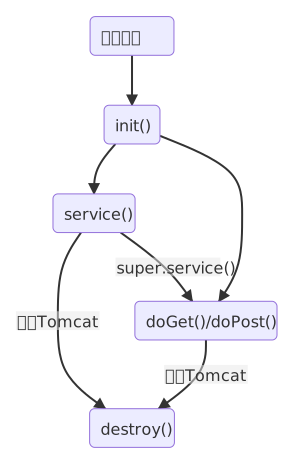
> Only handles process flow, separated from JSP.
> extend HttpServlet throw ~Exception
> Use it by overriding doGet(req, resp) and doPost(req, resp)
>
> Locate with the annotation @WebServlet(“url”)
> You can also locate with web.xml (when creating a project, checking it at next can create it automatically)
```xml
LoginServlet
com.sikiedu.servlet.LoginServlet
LoginServlet
/login_ do
```
---
> #### Lifecycle
## EL Expressions
> Used to simplify JSP syntax, reduce code volume, and improve readability.
#### Getting Variables
> 1. $
> 2. $
>
> (~ is req, session, application)
> (scope priority is req, session, application)
>
> ***Generally, using the first form is enough***
#### Getting Class Variables
> $
#### Getting Map and Collection Values
> ${map.key} and $
#### Operations
> ${±\*/}
> ${> \< == || !}
> $
#### Implicit Objects
> $
## JSTL Tags
> Further simplifies JSP syntax and improves code readability.
> It has the rudiments of syntax of some modern data-driven frontend frameworks.
> Such as Vue.js and Angular.js.
#### Download JAR Package
> [Download link -> mvnrepository](https://mvnrepository.com/artifact/javax.servlet/jstl/1.2)
#### Import
```xml
<%@ taglib uri="http://java.sun.com/jsp/jstl/core" prefix="c" %>
```
#### Define Values
```xml
```
#### Remove Values
```xml
```
#### Output Values
```xml
```
#### Conditional Judgement
```xml
code
code
```
#### Loops
```xml
code
${x.var}
```
## JSON
> The full name is "JavaScript Object Notation",
> A lightweight data interchange format; its prototype is the data object in JavaScript.
> [Learn more](https://www.json.org/json-zh.html)
## fastjson
> An open-source Java-side JSON manipulation library from Alibaba.
> [fastjson's official GitHub](https://github.com/alibaba/fastjson)
#### Download JAR Package
> [Download link->mvnrepository](https://mvnrepository.com/artifact/com.alibaba/fastjson/1.2.62)
#### Import
```java
import com.alibaba.fastjson.JSON
```
#### Serialization
```java
JSON.toJSONString(object);
```
#### Deserialization
```java
JSON.parseObject(String, object.class);
```
#### Serializing Arrays
```java
JSON.parseArray(String, object.class);
```
## AJAX
> The full name is "Asynchronous Javascript And XML",
> A technology that updates data without refreshing the web page through asynchronous requests.
> ***This is a JavaScript technology, not a Java one.***
#### JQuery Implementation
```JavaScript
setInterval("callAjax()", 2000);//定时调用方法,参数单位为毫秒
function callAjax() {
$.ajax({
url: "${pageContext.request.contextPath }/ajaxrequest" ,
type:"get",
success: function(msg){
}
});
$("input").blur(callAjax); //失焦响应方法
```
#### Native JS Implementation
```JavaScript
function callAjaxByJS(){
var xmlhttp = new XMLHttpRequest();
xmlhttpopen("GET", endcodeURI("${pageContext.request.contextPath}/ajaxRequest?data=我是数据&"+Math.random()), true)
xmlhttp.send();
xmlhttp.onreadystatechange = function(){
if( xmlhttp.readyState==4 && xmlhttp.status==200 ){
//得到了服务器端的响应,4代表ajax响应已完成,200是http正常状态码
$("#msg").append(xmlhttp.responseText);
}
}
}
```
## Filter
> class implement Filter
#### Lifecycle
> Constructor->init()->doFilter()->destory()
#### doFilter()
> chain.doFilter() will start the filter chain.
```java
public void doFilter(ServletRequest request, ServletResponse response, FilterChain chain) throws IOException, ServletException{
// TODO Auto-generated method stub
// place your code here
System.out.println("test1 filter before");
// pass the request along the filter chain
chain.doFilter(request, response);
System.out.println("test1 filter after");
}
```
> Configure filtering conditions and order through web.xml,
> or use @WebFilter(“/\*”) to set conditions.
```xml
Test1Filter
com.sikiedu.filter.Test1Filter
Test2Filter
com. sikiedu.filter.Test2Filter
Test2Filter
/*
Test1Filter
/*
```
> The order set in web.xml is reversed during response,
> that is, the code written after chain.doFilter() is executed.
> Generally there is no need to use it.
#### Permission Management Filtering
```xml
AdminFilter
com.sikiedu.filter.AdminFilter
AdminFilter
/admin/*
```
#### Request Filtering
> Filter the request types initiated by the client to JSP.
> ***This request does not refer to get and post, but to the request types defined by JSP.***
```xml
DispatcherFilter
com.sikiedu.filter.DispatcherFilter
DispatcherFilter
/dispatcher1. jsp
ERROR
```
> There are five dispatcher types; the first four are commonly used.
>
> > 1. REQUEST Normal request
> > 2. FORWARD Request forwarding
> > 3. INCLUDE \
> > 4. ERROR Error request
> > 5. ASYNC Asynchronous request???
> >
> > #### Error Page Settings
```xml
404
/dispatcher1.jsp
```
## Listeners
> 1. A listener is a class; create a class
> 2. Implement the listener interface
>
> > Creation and destruction state listening
> > ~initialized() ~Destroyed()
> >
> > > javax.servlet.ServletContextListener
> > > HttpSessionListener
> > > ServletRequestListener
> >
> > Attribute listening
> > ~Added() ~Replaced() ~Removed()
> >
> > > ServletContextAttributeListener
> > > HttpSessionAttributeListener
> > > ServletRequestAttributeListener
> >
> > Session binding listening
> >
> > > 1. Make the model implement HttpSessionBindingListener
> > > 2. Override the valueBound() and valueunbound() methods
> 3. Configuration
```xml
package.Listen-name.class
```
> 4. Set session timeout
```xml
1
```
# Special Topics
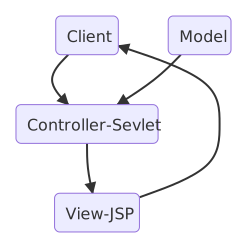
## MVC Architecture
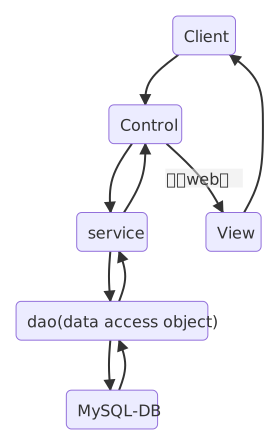
## J2EE Layered Architecture
## Singleton Pattern
> Privatize the constructor and create an instance.
> Avoid creating commonly used objects with new multiple times.
```java
public static JDBCUtil instance = new JDBCUtil();
private JDBCUtil() {
}
```
## Relative Paths and Absolute Paths
#### Client-Side Paths
> Displayed in the client address bar or source code and can be requested.
> Such as [and the accessed URL.](URL)
> Relative Paths
>
> > Determined by the path where the current URL directory is located.
>
> Absolute Paths
>
> > Determined by the host (domain name) root path.
> > ***Generally, keep the path correct by adding contextPath.***
> > <%=request.getContextPath()%>
> > or ${pageContext.request.contextPath}
#### Server-Side Paths
> Executed only inside JSP.
> Such as \ or request forwarding.
> Relative Paths
>
> > Determined by the path where the current JSP file is located, in the form "xxx.jsp".
>
> Absolute Paths
>
> > Determined by the project path, in the form "/folder/xxx.jsp".
> > ***No need to add the project name.***
#### ***In actual use, it is recommended to use absolute paths to avoid errors.***
## Solving Chinese Parameter Garbled Text
> Set encoding for String
```java
System.out.println(new String(sex.getBytes("iso-8859-1"), "utf-8"));
```
> Set encoding for request
```java
request.setCharacterEncoding("utf-8");
```
> Set encoding for response
```java
resp.setContentType("text/html; charset=utf-8");
```
> ***Ultimate solution: set encoding globally in doFilter***
```java
encoding = fConfig.getInitParameter("Encoding");
```
```xml
EncodeFilter
com.sikiedu.filter.EncodeFilter
Encoding
UTF-8
EncodeFilter
/*
```
## Single Sign-On
> 1. Create a sessionManager class and build a collection of sessions (implemented with hashmap).
> 2. Control through the added listener of session-attribute.
```java
if(arg0.getName().equals("user")) {
User u = (User) arg0.getValue();
//判断是否有其他客户端已经登录
if(Sess ionManager . sess ionMppE containsKey(u. getUsername())) {
//获得另外一一个客户端的session
HttpSession session = SessionManager.sess ionMap. get(u.getUsername());
//把登录信息从这个客户端抹除
session. removeAttribute("user");
}
SessionManager.sessionMap.put(u.getUsername(), arg0.getSession());
}
```
## Postscript
#### Next Steps for Learning
> I personally suggest taking the SSM framework as the learning direction; SiKi Academy also has courses.
> The SSH framework is somewhat outdated in some places; consider it as appropriate.
#### If You Want to Seek a Job
> I personally suggest going back to review Java fundamentals after finishing learning the SSM framework.
> Mainly use Volume 1 and 2 of 《Java Core Technology》 as reference books.
> At the same time, you also need to learn basic knowledge related to data structures and algorithms.
## Contact Me
#### GitHub
If you find these notes helpful, welcome to give me a Star.
Here is the project address for these notes: [GitHub](https://github.com/endcloud/JavaWeb_learn_siki)
Related code and notes will continue to be updated here.
What I have learned is still insufficient; you can also submit a PR here to correct my mistakes. I would be very grateful.
#### e-mail
In addition, you can also contact me by email.
My email is: endcloud@qq.com